Receipts
The app makes 1 tax receipt for each payer for each tax year. The receipt lists the payer's tax-deductible payments.
Set up your receipt letter
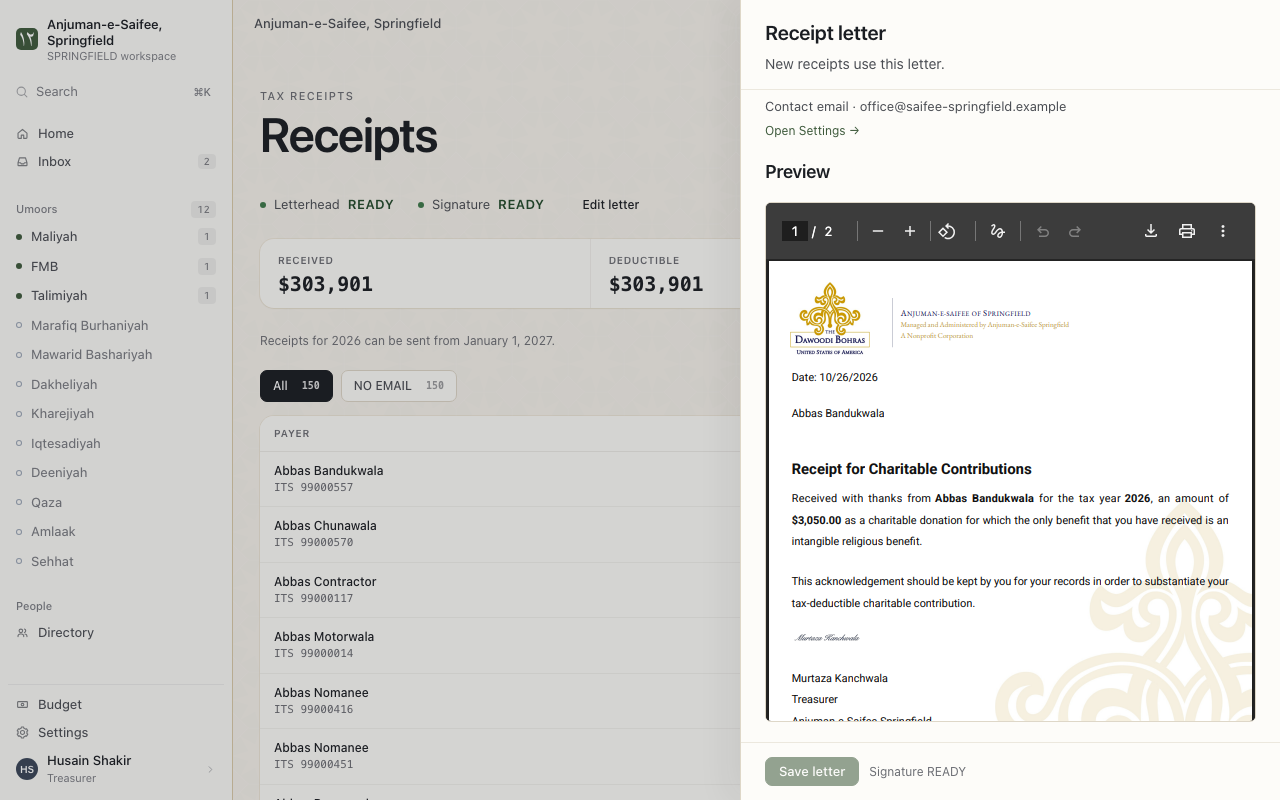
This is for the treasurer. Do this once, before the first receipts.
Where. Receipts > Edit letter.
- Fill Organization line, Address line 1 and Tax ID.
- Fill Signatory name and Signatory title. This is the person who signs the receipts.
- Press Upload signature. Choose an image of the signature.
- Press Save letter.
The page shows Preview of the receipt letter. New receipts use this letter.
Send receipts for a year
Where. Receipts, then choose the year.
- Check the list of payers. Each shows Received and Deductible.
- A payer has no email? Add it in the directory or in QuickBooks. Or press Download PDF and give it by hand.
- Press Send this receipt.
Reminders. A tax year must end first. For example: send 2026 receipts from January 2027.
A payment changed after you sent a receipt
A payment can change in QuickBooks after you send its receipt. The app marks that receipt CHANGED. It makes a new version.
- Open the payer.
- Press Send corrected receipt. Or press Download corrected receipt.
Send a receipt again
A member lost the email. Open the payer. Press Send receipt again.